New to online business? Start with our free 7-day roadmap and build your foundation step by step.
Get the Free Roadmap →Ecommerce
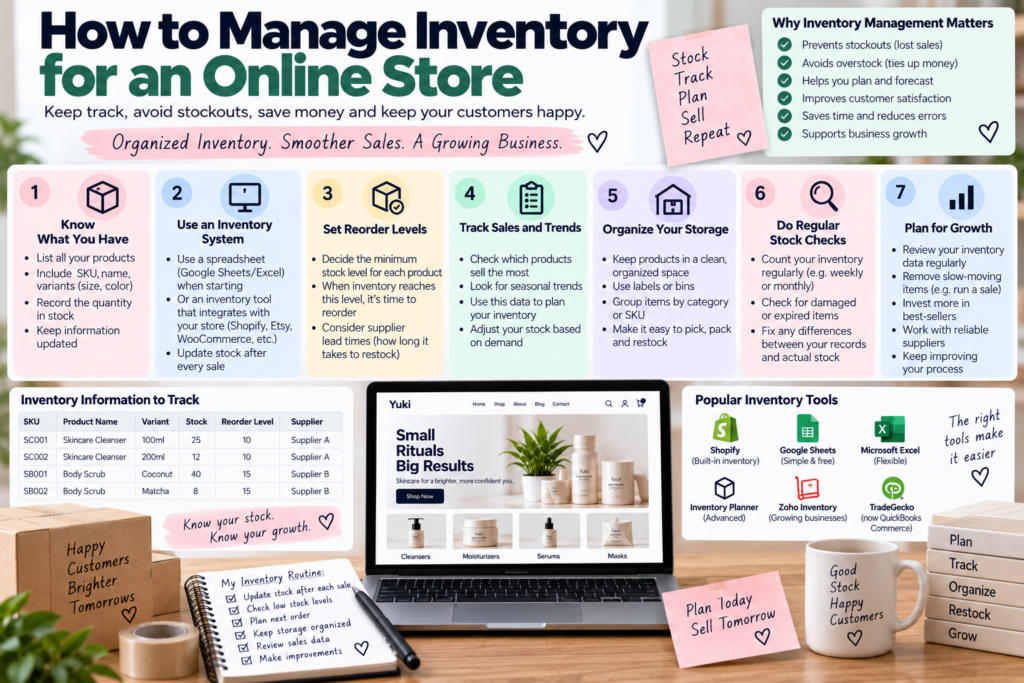
How to Manage Inventory for an Online Store
How to Manage Inventory for an Online Store
Learning how to manage inventory for an online store is one of those operational skills that doesn’t feel urgent until a customer orders something you don’t actually have in stock. At that point, inventory management stops being an abstract best practice and becomes a direct threat to your reputation and your margins. This guide walks through the practical systems and habits that help you manage inventory for an online store reliably, whether you’re shipping ten orders a week or a few hundred.
Why Inventory Management Matters More Than It Seems
Poor inventory management creates two expensive problems: overselling products you don’t actually have, which leads to cancellations and frustrated customers, and overstocking products that don’t sell, which ties up cash in inventory sitting on a shelf instead of being reinvested in the business. Both problems are preventable with the right systems in place, but both tend to get worse the longer they’re ignored, since inaccurate stock counts compound over time as more orders come through.
Step 1: Choose an Inventory Tracking Method That Matches Your Scale
A brand-new store with a handful of products can often manage inventory for an online store reasonably well using a simple spreadsheet, manually updated after each order and restock. As product count and order volume grow, this becomes error-prone and time-consuming, and dedicated inventory management software — either built into your ecommerce platform or a separate tool — becomes worth the investment. The right method depends on your current scale, not where you expect to be eventually; overbuilding inventory systems before you need them wastes time that could go toward sales and marketing.
Step 2: Set Up Real-Time Stock Tracking
Whatever method you choose, the goal is for your displayed stock levels to reflect reality as closely as possible. Most ecommerce platforms like Shopify and WooCommerce automatically reduce stock counts when an order is placed, which is the baseline every store should have running correctly before worrying about more advanced inventory features. Manually tracking stock outside the platform, then updating the website periodically, introduces delays that can lead directly to overselling.
Step 3: Set Low-Stock Alerts
Running out of a popular product without warning means missed sales and a scramble to restock under pressure. Setting low-stock thresholds that trigger an alert — many platforms support this natively — gives you lead time to reorder before a product actually sells out completely. This is particularly important for products with longer supplier lead times, where running out can mean weeks of lost sales rather than just a few days.
Step 4: Decide How to Handle Out-of-Stock Products
Even with good tracking, products will occasionally sell out. Deciding in advance how you’ll handle this — removing the listing entirely, marking it as out of stock but keeping the page live for SEO purposes, or offering a “notify me when available” option — prevents a confusing, inconsistent experience for customers who land on an out-of-stock page. Keeping the page live with a clear out-of-stock notice and an email signup option is often the better choice, since it preserves any SEO value the page has built up while still capturing interest from customers for when stock returns.
Step 5: Build a Reordering Rhythm
Reactive reordering — waiting until stock hits zero before contacting a supplier — creates unnecessary stockouts, especially with suppliers who have longer lead times. Building a regular reordering rhythm based on how quickly each product actually sells, rather than reordering at the same arbitrary interval for every product, keeps popular items in stock while avoiding excess inventory on slower-moving ones. Reviewing sales velocity for each product periodically helps you adjust these reorder points as demand shifts over time.
Step 6: Audit Your Inventory Regularly
Even with good tracking systems, discrepancies between recorded stock and actual physical stock happen — from damaged items, miscounts, or data entry errors. Conducting periodic physical inventory counts, even informal ones, catches these discrepancies before they compound into bigger problems like confidently selling a product you don’t actually have.
Connecting Inventory to Your Pricing and Product Decisions
Inventory data isn’t just about knowing what’s in stock — it’s one of the clearest signals you have about which products are actually worth continuing to sell. Our guide on how to choose products to sell online covers how to evaluate product ideas before you commit to holding stock, but inventory turnover data after launch is just as useful for deciding what to keep, discontinue, or reorder in larger quantities. A product that moves quickly and consistently deserves more investment; one that’s barely moving after a reasonable testing period is usually telling you something worth listening to, regardless of how much you personally like the product.
Inventory levels also directly affect how you should think about pricing. Our guide on how to price products for an online store explains how holding costs and cash tied up in slow-moving stock should factor into your margin calculations, not just the unit cost of the product itself.
Tools That Help You Manage Inventory for an Online Store
Beyond spreadsheets and built-in platform tracking, dedicated inventory tools like Cin7, Skubana, or even simpler options integrated directly with Shopify can automate much of the reordering and multi-channel syncing work described above. For sellers tracking broader store performance alongside inventory, pairing these tools with Google Analytics gives a fuller picture of how stock levels, sales velocity, and overall site traffic relate to each other. Most of these tools offer free trials or low-cost entry tiers, making it reasonable to test one before committing to a longer-term subscription once your inventory needs outgrow a spreadsheet.
Seasonal and Demand Fluctuations
Inventory needs rarely stay flat throughout the year. Products tied to seasons, holidays, or trends can see demand spike and then drop sharply, and failing to plan for this creates two opposite problems depending on timing: stockouts during a demand spike you didn’t prepare for, or excess inventory left over once a seasonal window closes. Reviewing sales history from previous periods, where available, or researching general demand patterns for new seasonal products helps you order appropriately ahead of predictable spikes rather than reacting to them after they’ve already started.
For entirely new products with no sales history, starting with a smaller initial order and scaling up reorders based on actual early performance is a safer approach than guessing at a larger quantity upfront and hoping demand matches your expectations.
Managing Inventory Across Multiple Sales Channels
If you sell through more than one channel — your own store plus a marketplace like Etsy or Amazon, for instance — inventory management becomes considerably more complex, since a sale on one channel needs to be reflected everywhere else immediately to avoid overselling the same item twice. Many inventory tools and platform integrations exist specifically to sync stock levels across multiple channels automatically. Without this kind of syncing, manually updating stock across several platforms after every sale becomes a significant time drain and a real source of errors as order volume grows.
Inventory Management for Dropshipping and Print-on-Demand
If you’re using a dropshipping or print-on-demand model, you don’t hold physical inventory yourself, but inventory management doesn’t disappear — it shifts to monitoring your supplier’s stock levels instead. Suppliers can run out of popular items without much warning, and if your store isn’t synced to reflect that, you risk selling products you can no longer actually fulfill. Choosing suppliers with reliable stock visibility, and checking in periodically rather than assuming availability is constant, protects you from this specific risk that’s easy to overlook in these fulfillment models.
How Inventory Decisions Affect Cash Flow
Every unit of inventory sitting unsold represents cash that isn’t available for other parts of the business — marketing, new product development, or simply operating expenses. Learning to manage inventory for an online store well means balancing having enough stock to avoid missed sales against tying up more cash than necessary in slow-moving products. Reviewing which products are actually turning over quickly versus which are sitting for months helps direct future purchasing decisions toward what’s actually working, rather than continuing to restock items out of habit.
How Inventory Accuracy Builds Customer Trust
Beyond the operational benefits, accurate inventory also plays a quiet role in customer trust. A store that consistently shows correct stock levels, delivers what it promises, and rarely needs to cancel orders due to unavailability builds a reputation for reliability that keeps customers coming back. Inconsistent or inaccurate inventory, on the other hand, tends to surface in reviews and complaints in ways that are harder to repair than the original stockout itself, since a canceled order after payment feels worse to a customer than simply not finding the product available in the first place.
Common Inventory Management Mistakes
Relying on manual tracking as volume grows. What worked with ten products becomes unsustainable with a hundred, and the transition to proper software is often delayed longer than it should be.
Ignoring sales velocity when reordering. Reordering every product on the same schedule, regardless of how quickly it actually sells, leads to both stockouts on popular items and excess stock on slow movers.
Not syncing inventory across multiple sales channels. This is one of the most common causes of overselling, particularly for sellers expanding beyond their own store for the first time.
Removing out-of-stock listings entirely. This discards SEO value a page may have built up and misses the opportunity to capture interest through a “notify me” option instead.
Skipping physical inventory audits. Assuming recorded stock levels always match physical reality eventually catches up with every seller who doesn’t periodically verify it.
Frequently Asked Questions
What’s the best way to manage inventory for a small online store just starting out? A simple spreadsheet or your ecommerce platform’s built-in stock tracking is usually sufficient for a small number of products. Dedicated inventory software becomes worth adopting as product count and order volume grow.
How often should I do a physical inventory count? This depends on your product volume, but many small sellers do a full count monthly or quarterly, with smaller spot checks more frequently for fast-moving or high-value items.
Do I need inventory management software if I’m dropshipping? It’s less critical than for sellers holding their own stock, but monitoring supplier stock levels and syncing availability to your store still matters to avoid selling products you can no longer fulfill.
What happens if I oversell a product that’s actually out of stock? This typically requires canceling the order, issuing a refund, and communicating promptly with the affected customer. Occasional oversells are manageable, but frequent ones damage trust and reviews significantly.
How much inventory should a new store order for its first batch? Starting smaller than you expect to need is generally safer, since you can use actual early sales data to guide larger reorders rather than committing significant cash to a product with no proven demand yet.
Can inventory management software pay for itself for a small store? Often yes, even at a relatively small scale, since the time saved on manual tracking and the stockouts or overselling it prevents frequently outweigh the subscription cost once order volume reaches even a modest, consistent level.
Treating Inventory Management as an Ongoing System, Not a One-Time Setup
It’s tempting to think of inventory management as something you set up once and then leave alone, but the systems that work well for a store with five products and a handful of weekly orders rarely scale cleanly to fifty products and daily order volume. Revisiting your approach periodically — the tools you use, how often you reorder, how you handle multi-channel syncing — ensures your systems keep pace with the business rather than quietly becoming a bottleneck you don’t notice until a stockout or an overselling incident forces the issue.
Sellers who treat inventory management as an evolving part of the business, reviewed and adjusted every few months alongside sales and marketing performance, tend to catch inefficiencies early. Those who set it up once at launch and never revisit it often end up managing inventory for an online store that’s quietly outgrown the systems supporting it, which usually surfaces at the worst possible time — during a sales spike or a particularly busy season when the margin for error is smallest.