New to online business? Start with our free 7-day roadmap and build your foundation step by step.
Get the Free Roadmap →Marketing
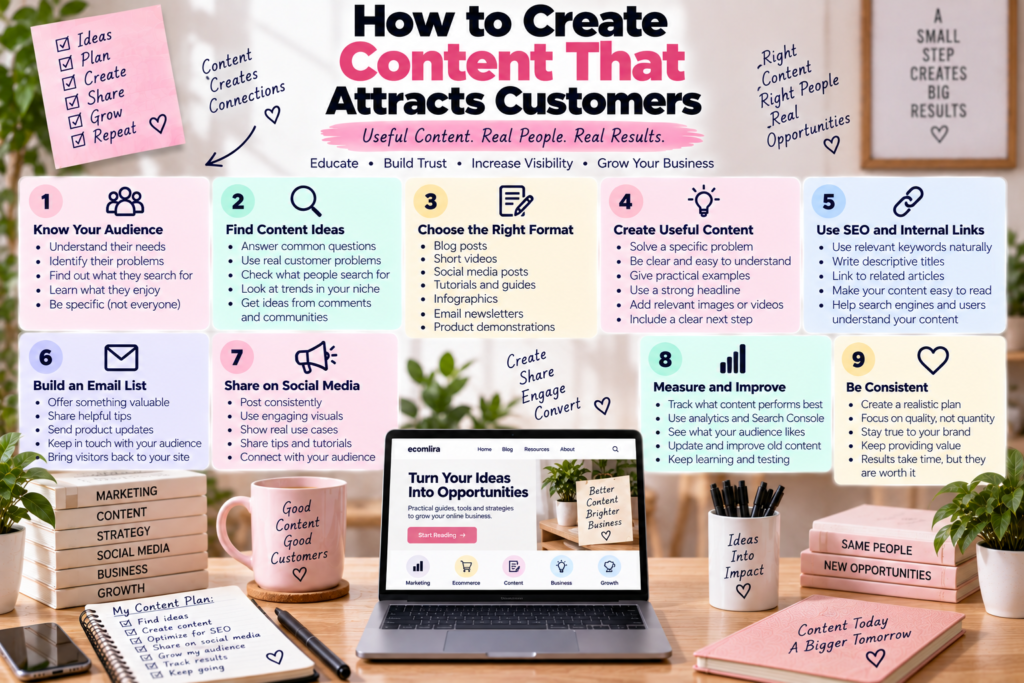
How to Create Content That Attracts Customers
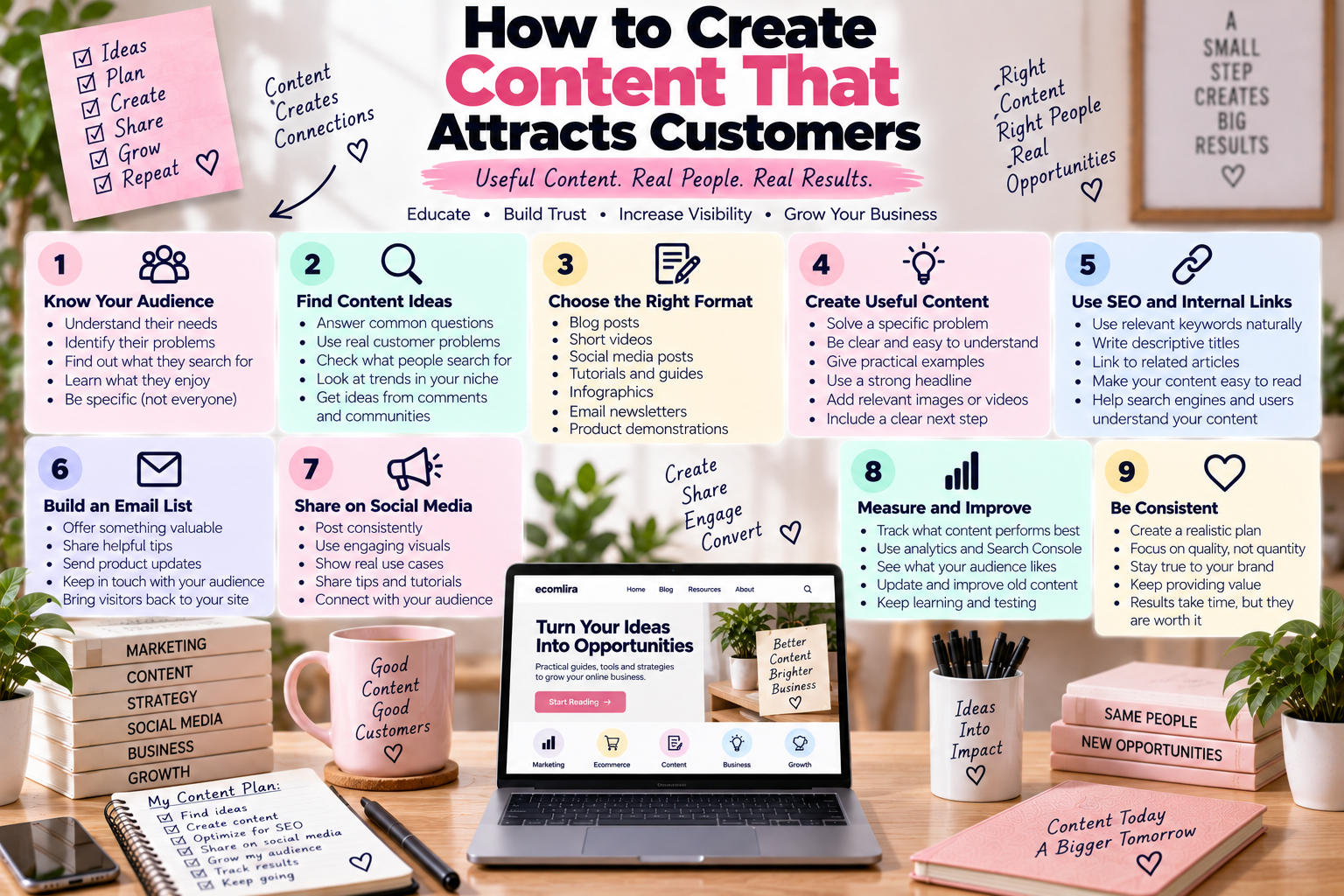
How to Create Content That Attracts Customers
Creating content is easy. Creating content that makes the right people stop, read, watch, and eventually consider your business is much more valuable.
How to Create Content That Attracts Customers starts with understanding what your audience actually needs rather than simply publishing as much as possible.
Good content should answer questions, solve problems, demonstrate expertise, or help people make better decisions.
Google’s guidance also emphasizes creating helpful, reliable, people-first content rather than content made primarily to manipulate search rankings.
1. Start With Your Audience
Before creating anything, think about the person you want to reach.
Ask yourself:
- What problems do they have?
- What questions do they ask?
- What are they trying to achieve?
- What products or services are they researching?
- What might stop them from buying?
- Where do they look for information?
For example, a business selling gym clothing could create content about choosing workout clothes, caring for activewear, or preparing for a first gym session.
A skincare business could create guides about building a routine, understanding ingredients, or choosing products for different skin concerns.
The subject may be different, but the principle is the same: create content around problems your potential customers genuinely care about.
2. Answer Questions People Are Already Searching For
One of the easiest places to find content ideas is in the questions people ask.
Think about searches beginning with:
- How
- What
- Why
- Which
- Can
- Is
- Where
- When
For an ecommerce website, examples could include:
- How do I start an online store?
- How much does ecommerce cost?
- How do I choose products to sell?
- What is dropshipping?
- How do I promote products online?
These questions can become articles, videos, social posts, guides, or email content.
Google recommends making content useful and easy for people to understand rather than writing primarily for search engines.
3. Choose the Right Content Format
Not every idea needs to become a blog post.
Depending on your audience, you could create:
- Blog articles
- Short videos
- Tutorials
- Instagram carousels
- TikTok videos
- Checklists
- Guides
- Infographics
- Email newsletters
- Product demonstrations
- Case studies
For example, a complicated tutorial may work better as a video, while a detailed comparison might work better as an article.
Choosing the right content format makes it easier for people to consume and understand your information.
If you’re starting with written content, you can also read How to Start Content Marketing.
4. Solve a Specific Problem
Broad content can be difficult to make useful.
Instead of writing:
“Everything About Marketing”
you could create:
“How to Market a Small Business Online”
The second topic gives you a much clearer problem to solve.
A specific article can explain the steps, examples, mistakes, and practical actions the reader needs.
That is more useful than filling a page with general information.
5. Create a Strong Headline
Your headline is one of the first things people see.
A good content headline should tell readers what they will get from the page.
Examples include:
- How to Start an Online Store
- How to Get Free Traffic to Your Website
- How to Promote Products Online
- What Is Content Marketing?
- How to Create a Marketing Strategy
Avoid headlines that promise something your article does not actually deliver.
Clear and descriptive titles are also useful for helping search engines and users understand what a page is about. Google’s SEO documentation recommends descriptive titles and content that helps users accomplish what they came to the page to do.
6. Make the Introduction Useful
Do not spend the entire introduction telling readers that your article is important.
Get to the point.
Explain:
- What problem the article addresses
- Why it matters
- What the reader will learn
For example:
Starting a website is relatively easy. Getting the right people to visit it is often more difficult. This guide explains practical ways to attract visitors through content, SEO, social media, email, and other channels.
The reader immediately understands what they can expect.
7. Give Practical Examples
People often understand an idea faster when they see an example.
Instead of saying:
“Create educational content.”
Show what that means.
For a clothing business:
- How to choose the right size
- How to style one item three ways
- How to care for a particular fabric
- What to wear for different occasions
For an ecommerce business:
- How to calculate product profit
- How to choose a supplier
- How to manage inventory
- How to ship orders
Examples make your useful content easier to understand and apply.
8. Use Internal Links
Your content should not exist as isolated pages.
Connect related articles so readers can continue exploring your website.
For example, this article can connect with:
- What Is Content Marketing?
- How to Start Content Marketing
- How to Get More Traffic to Your Website
- How to Promote Products Online
This creates a better content strategy because one article can lead readers naturally to another relevant resource.
Google also explains that links can help users and search engines discover other relevant pages on a website.
9. Include Useful Outbound Links
You do not need to keep readers completely inside your website.
Sometimes the best way to make an article more useful is to point readers toward an authoritative source.
For SEO-related topics, you can link to Google Search Central or Google’s SEO Starter Guide.
For social media marketing, you might link to the official platform’s business resources.
The important thing is relevance. An external link should help the reader understand something that your article cannot fully cover.
10. Show People What to Do Next
A useful article should not necessarily end with:
“Thanks for reading.”
Give the reader a logical next step.
You could encourage them to:
- Read a related guide
- Download a checklist
- Join your newsletter
- Explore your products
- Watch a tutorial
- Compare different options
- Contact your business
For example, someone reading about website traffic could continue with How to Get Free Traffic to Your Website.
This creates a smoother customer journey.
11. Use Content to Build Trust
People rarely buy from a business simply because it published one article.
Trust develops over time.
You can build that trust by consistently providing:
- Accurate information
- Helpful explanations
- Real examples
- Clear product information
- Honest limitations
- Useful resources
- Consistent communication
Avoid making exaggerated promises just to get attention.
A customer who feels that your content is genuinely useful is more likely to remember your business when they eventually need what you sell.
12. Create Content for Different Stages of the Customer Journey
Not everyone visiting your website is ready to buy.
Some people are just discovering a problem.
Others are researching solutions.
Some are comparing products.
A smaller group may already be ready to purchase.
Your content can support each stage.
Awareness
Create educational content that introduces a topic.
Research
Create guides, comparisons, tutorials, and explanations.
Consideration
Show product benefits, examples, reviews, and demonstrations.
Purchase
Make product information, pricing, shipping, and returns easy to understand.
After Purchase
Create tutorials, care instructions, troubleshooting guides, or helpful follow-up content.
This gives your customer-focused content a purpose beyond simply bringing visitors to your website.
13. Repurpose Your Best Content
You do not have to create something completely new every day.
One strong article can become several pieces of content.
For example:
One article
↓
Instagram carousel
↓
TikTok video
↓
Facebook post
↓
Email newsletter
↓
Short educational video
↓
Pinterest graphic
The message can stay consistent while the format changes.
This can make your content creation strategy much easier to maintain.
14. Update Content That Already Exists
Creating new content is not always the best use of your time.
Look at your existing articles and ask:
- Is the information still accurate?
- Could I add better examples?
- Are there missing questions?
- Are the links still useful?
- Could the introduction be clearer?
- Is the article still relevant?
Google’s current documentation continues to emphasize useful, people-first content and provides guidance for evaluating and improving existing content.
Updating a useful article can sometimes be more valuable than publishing another page on a completely unrelated topic.
15. Measure What Your Audience Responds To
You do not need to guess forever.
Use tools such as Google Search Console to understand how your website performs in Google Search.
You can also use analytics to examine:
- Which pages receive visitors
- Where visitors come from
- Which pages receive engagement
- Which content leads to conversions
- Which topics attract your target audience
Then use those insights to improve your future content.
A Simple Content System for Beginners
If you’re overwhelmed by all the possibilities, start small.
Step 1: Choose one audience
Decide exactly who you want to help.
Step 2: Find five questions
Write down five questions that audience is likely to ask.
Step 3: Create useful answers
Turn those questions into articles, videos, or other useful resources.
Step 4: Connect the content
Add internal links between related pages.
Step 5: Promote the content
Share it through the social platforms and channels your audience uses.
Step 6: Measure the results
Look at traffic, engagement, search visibility, and conversions.
Step 7: Improve
Keep the content that works, improve weaker pages, and create new content based on what you learn.
Common Content Marketing Mistakes
Creating more content does not automatically create more customers.
Avoid:
- Writing about topics your audience does not care about
- Copying other websites
- Using misleading headlines
- Publishing very thin articles
- Repeating keywords unnaturally
- Making unsupported claims
- Ignoring older content
- Creating content only for search engines
- Publishing without a clear purpose
- Focusing entirely on traffic instead of useful outcomes
Google’s guidance specifically encourages people-first content and warns against creating content primarily to attract search-engine traffic rather than helping users.
Final Thoughts
How to Create Content That Attracts Customers is really about understanding people before creating content.
Find the questions your audience has, provide useful answers, use the right formats, connect related resources, and give readers a logical next step.
You do not need to publish every day.
A smaller collection of genuinely useful resources can become a strong foundation for your website, search visibility, social media, email marketing, and customer relationships.
FAQ
What type of content attracts customers?
Educational articles, tutorials, product demonstrations, comparisons, checklists, videos, reviews, and useful guides can all attract potential customers when they address a real need.
How often should a business publish content?
There is no universal publishing schedule. A realistic schedule that allows you to consistently create useful content is generally better than publishing large amounts of low-quality content.
Should every piece of content promote a product?
No. Educational content can attract people before they are ready to buy. Product-focused content can then help people who are closer to making a purchasing decision.
How do I know what content my customers want?
Look at questions customers ask, search queries, comments, social media discussions, competitor topics, website analytics, and Search Console data.
Can content marketing work for a small business?
Yes. Small businesses can use content to answer niche questions, demonstrate expertise, attract search traffic, and build relationships with potential customers.